
Array Query
Array mode runs PHP returning WP_Query arguments. Use it for dynamic IDs, visitor-specific lists, or logic the visual Query Builder cannot express.
Enter Query Arguments
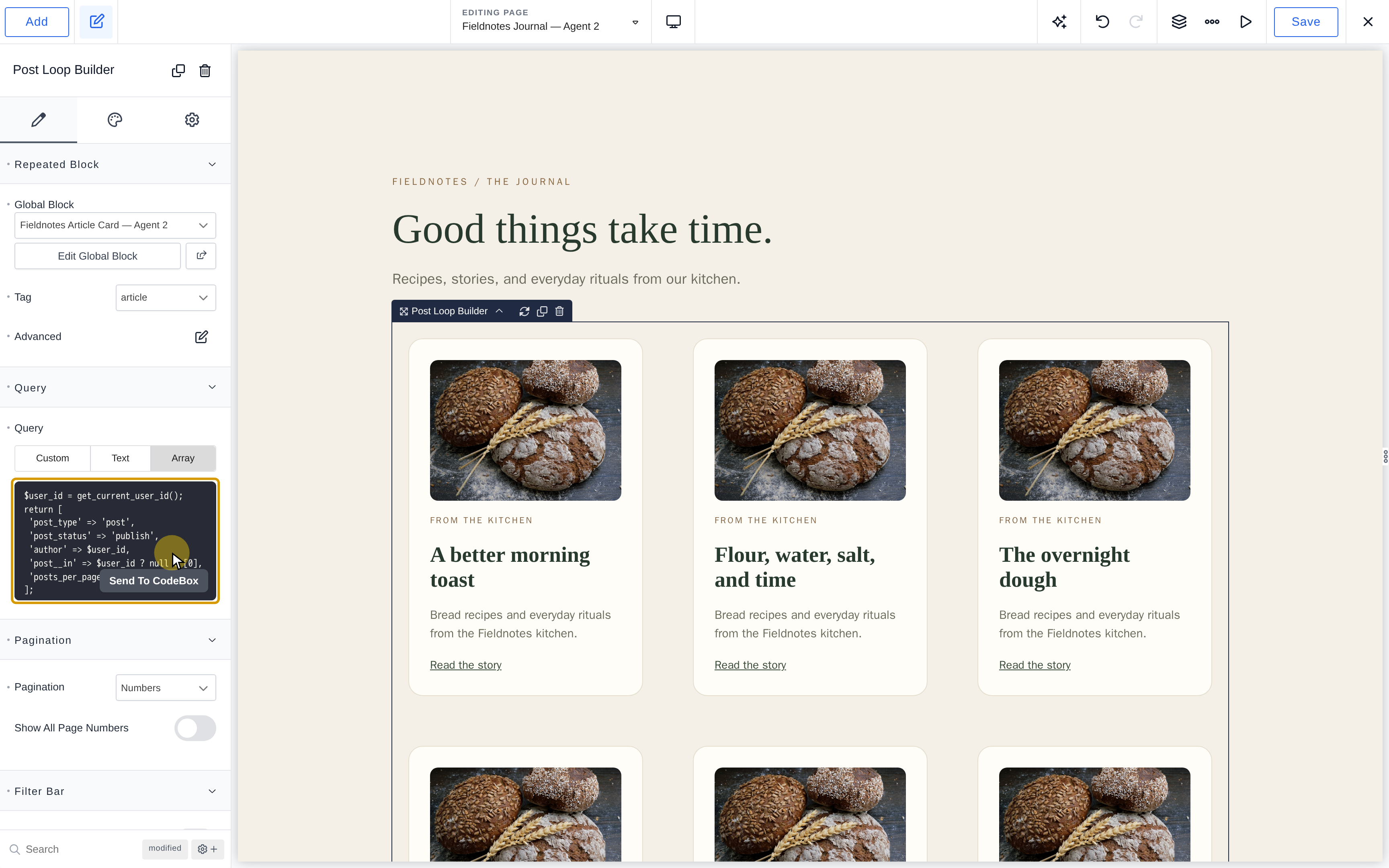
- Select the loop and open Content > Query > Array.
- Enter PHP without opening or closing PHP tags.
- Return an argument array, then save and test the front end.
Return arguments—not a WP_Query object, result posts, or HTML. Breakdance runs the query and renders the repeated block.
Examples
Show the Visitor's Posts
This uses the current visitor rather than the viewed post's author. Logged-out visitors receive no results:
$user_id = get_current_user_id();
return [
    'post_type' => 'post',
    'post_status' => 'publish',
    'author' => $user_id,
    'post__in' => $user_id ? null : [0],
    'posts_per_page' => 6,
];
get_current_user_id() returns 0 when logged out. The explicit post__in guard prevents an unrestricted list.
Filter by the Current Term
Use this for an additional term-based list. For a template's main archive results, leave the loop query unset to inherit the request.
$term = get_queried_object();
if (!($term instanceof WP_Term)) {
    return ['post__in' => [0]];
}
return [
    'post_type' => 'any',
    'post_status' => 'publish',
    'posts_per_page' => 6,
    'tax_query' => [[
        'taxonomy' => $term->taxonomy,
        'field' => 'term_id',
        'terms' => [$term->term_id],
    ]],
];
The context check returns no posts outside a term archive.
Filter and Sort a Stored Date
For an event date stored as Ymd, compare the same format numerically:
return [
    'post_type' => 'event',
    'post_status' => 'publish',
    'meta_key' => 'event_date',
    'orderby' => 'meta_value_num',
    'order' => 'ASC',
    'posts_per_page' => 6,
    'meta_query' => [[
        'key' => 'event_date',
        'value' => current_time('Ymd'),
        'type' => 'NUMERIC',
        'compare' => '>=',
    ]],
];
Replace event and event_date with your registered post type and field key. A date stored as Y-m-d needs a matching comparison; display formatting does not determine storage.
Query Meta Box Relationships
With MB Relationships active, request a course's connected lessons using the registered relationship ID and direction:
return [
    'post_type' => 'lesson',
    'post_status' => 'publish',
    'posts_per_page' => 6,
    'relationship' => [
        'id' => 'courses_to_lessons',
        'from' => get_queried_object_id(),
    ],
];
These connections are not ordinary post metadata. Replace the example identifiers with your relationship definition.
Posts by the Viewed Post's Author
$post_id = get_queried_object_id();
$author_id = (int) get_post_field('post_author', $post_id);
return [
    'post_type' => 'post',
    'author' => $author_id,
    'post__in' => $author_id ? null : [0],
];
This reads the author of the viewed post, not the logged-in visitor.
Children of the Current Post
return [
    'post_type' => get_post_type(),
    'post_parent' => get_the_ID(),
];
Use this in a post context with a hierarchical post type.
Posts Selected by an ACF Taxonomy Field
Configure the ACF field to return term IDs. Replace acftax and category with your field name and taxonomy:
$term_ids = function_exists('get_field') ? get_field('acftax') : [];
$term_ids = array_filter(array_map('intval', (array) $term_ids));
if (!$term_ids) {
    return ['post__in' => [0]];
}
return [
    'post_type' => 'post',
    'tax_query' => [[
        'taxonomy' => 'category',
        'field' => 'term_id',
        'terms' => $term_ids,
        'operator' => 'IN',
    ]],
];
Posts Matching the Search Query
return [
    's' => get_search_query(),
];
For the main listing on a search template, an unset loop query already inherits the search request.
Other Posts Sharing the Current Post's Terms
$taxonomy = 'genre';
$post_id = get_the_ID();
$term_ids = wp_get_post_terms($post_id, $taxonomy, ['fields' => 'ids']);
if (is_wp_error($term_ids) || !$term_ids) {
    return ['post__in' => [0]];
}
return [
    'post_type' => 'any',
    'post__not_in' => [$post_id],
    'tax_query' => [[
        'taxonomy' => $taxonomy,
        'field' => 'term_id',
        'terms' => $term_ids,
        'operator' => 'IN',
    ]],
];
Replace genre with the registered taxonomy. IN matches any selected term; AND requires all selected terms.
Handle Empty Results and Pagination
An empty post__in array does not mean “no posts”; return [0] explicitly. Check context and plugin availability before calling provider functions.
Array queries can inherit loop pagination, but fixed paged or offset arguments can override it. Use a stable order and test subsequent pages.
Every code branch must return an array. A syntax error can interrupt rendering; check PHP on a draft or isolated page before applying it to a shared template. See WP_Query arguments..